





Would you like to analyze data from Business Central without running a report or switching to another application? The data analysis mode on list pages offers an interactive and versatile way to calculate, summarize, and explore data.
Required
The data analysis mode is currently in preview and must be enabled by an administrator. Administrators can do this by going to the ‘Feature management’ page and the feature ‘Functionality Update: Analysis Mode, Analyze Data Directly in Business Central Quickly’ to activate. This feature will be available starting in Q4 2023.
Action!
On a list page, for example customer entries, you can enable data analysis mode using the ‘Analyze’ function. Easily create an overview of open items per customer for a specific customer group.
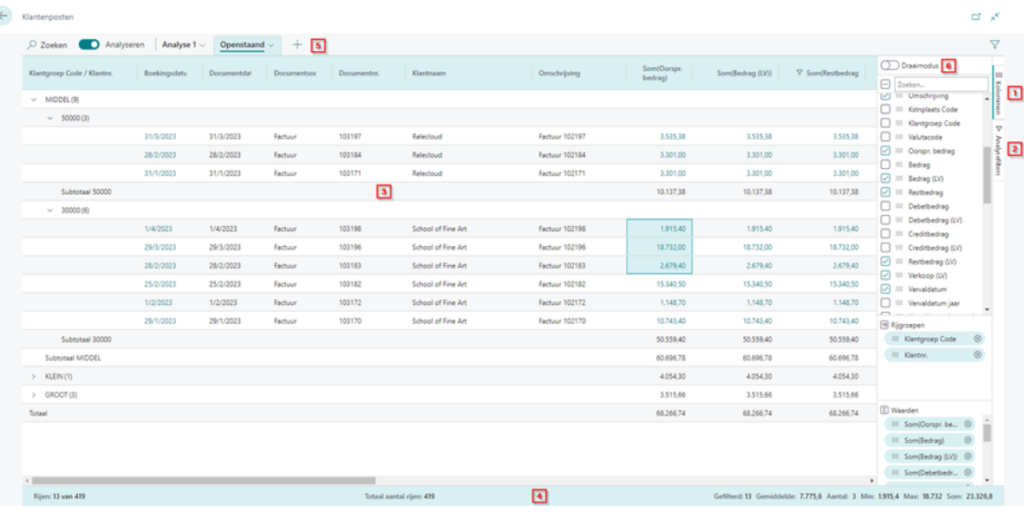
- In the pane Columns Define which columns should be included in the analysis, which fields you want to group by, and what total you want for fields containing numbers (e.g., sum, average, min, max, etc.)
- In the Analysis filter Adjust your filters on the columns to narrow down the data in the list. For example: Remaining amount is greater than 0.
- In the Data area The rows and columns of the list page are displayed, and the data is summarized. For some columns, subtotals will be visible.
- In the Overview bar The statistics for the list are displayed. When you select multiple rows in a column containing amounts, the average, count, minimum, maximum, and sum are displayed for the selection.
- If you want to perform multiple analyses on a list, you can multiple Tabs make. These tabs will remain until you remove them. Tabs that you set are only visible to yourself.
- You can the Rotation mode activate to analyze a large amount of numerical data. This mode is similar to pivot tables in Microsoft Excel.
author: Riet Mondelaers
Do you have any further questions on this topic or are you interested in implementing Business Central in your company? Don't hesitate to contact us using the form below. We are ready to help you!